


Radio Mexico - online radio
4.85.81K Reviews
App Specs
- Version
- 4.2.30
- Updated On
- License
- Free
- Downloads
- 5,000,000+
- Developer
- Radio FM Online Free
- Categories
- Music & Audio
- Platform
- Android
Screenshots
 Analysis by AppCompare
I judge a radio app less by how many stations it can name than by how quickly it helps me find something worth leaving on. Radio Mexico - online radio has a clear purpose: it brings Mexican broadcasts together for listeners who want a live connection to music, conversation, and places across the country. That focus is its strongest point, though it also means this is not a replacement for a music service built around precise playlists or offline listening.
A focused way to hear Mexican radio
Radio is different from choosing individual tracks: a station can introduce a singer or style I would not have searched for, and its presenters give the listening experience a sense of place. This app is most useful when I want that element of surprise rather than complete control over every song. The selection is broad enough to invite browsing, while the Mexico-first focus makes it easier to explore a sound world that can get buried in general-purpose audio apps.
That distinction matters if you are deciding what to install. If I already know the exact album or artist I want, an on-demand service is usually the more direct tool. If I want a live stream that can run in the background while I cook, work through chores, or settle into an evening, radio is a better fit. Here, the appeal is not simply playing Mexican music; it is sampling stations and letting each one shape the mood.
Getting Started with Radio Mexico
First things first, let's chat about the setup. Downloading Radio Mexico - online radio was a breeze. Available on both Android and iOS, you just head over to the app store, hit download, and you're ready to roll. The interface is clean, intuitive, and super easy to navigate. No need to be a tech wizard to get started here!
Exploring the Stations
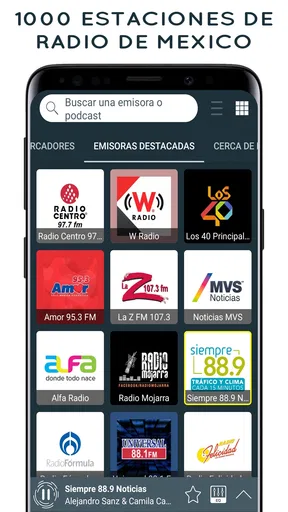
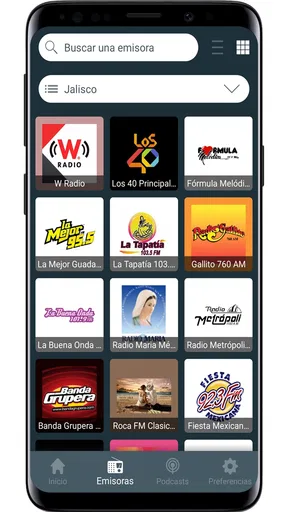
Once you’ve opened the app, you’re greeted with a huge variety of stations to choose from. We're talking everything from regional Mexican music to the latest pop hits. There's even talk radio for those who want to brush up on their Spanish or get a taste of Mexican news and culture straight from the source.
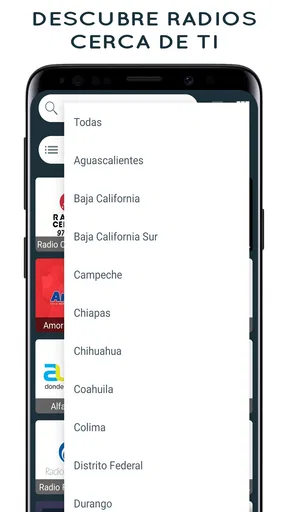
The app offers a neat little feature where you can browse stations by genre or city. So if you're in the mood for some classic norteño, you can find it easily. Or, if you’re missing the vibes of Mexico City, just tune into a local station from there. It's like a musical tour of the country without leaving your couch.
How I’d use it during an ordinary day
A useful way to approach a large station collection is to browse with a purpose instead of trying to inspect everything. On a weekday morning, I might start with a station associated with a city or region I want to hear, then switch to a genre when I want the music to set a steadier pace. That small change of approach turns browsing into a quick choice rather than a long search session.
Worth Reading Before You Choose

EA SPORTS FC Mobile 26 Is a Bigger Football Game, but It Takes Time

Flipboard Shows What News Apps Must Do Beyond the Feed

Switching to Android Auto Means Rethinking Your Driving Routine

Google Calendar Makes a Crowded Week Easier to Manage

Ludo King Makes the Most of the Minutes Between Plans

Baby Panda World Brings Quick Play to Modern Phones, but Its Game Library Feels Busy
For a realistic example, imagine making breakfast before work: I would pick a familiar regional sound while getting ready, then keep the stream on as I tidy up. If a presenter or a different musical style catches my attention, I can note the station and return to it later rather than interrupting the morning to search for individual songs. In the evening, talk radio can serve a different purpose, especially for listeners who enjoy hearing spoken Spanish in a natural broadcast context. It is exposure, not a structured language course, but it can make listening practice feel less like homework.
There is also a useful trade-off in choosing a live station over a playlist. A station can keep the room feeling lively without asking me to make a new decision every few minutes, but I have less control over the next song and cannot assume a particular track will come on. If a specific song matters, I would switch to an on-demand music app; if a continuous stream and the possibility of discovery matter more, radio makes sense.
Making a large catalogue easier to use
When there are many stations to explore, I find it helps to treat the city and genre options as two different starting points. A city is useful when I want a local flavor or a sense of what a broadcast from a particular place sounds like. A genre is better when I already know the mood I want, such as a more traditional regional style. Switching between those approaches can uncover stations I might miss if I always browse in the same way.
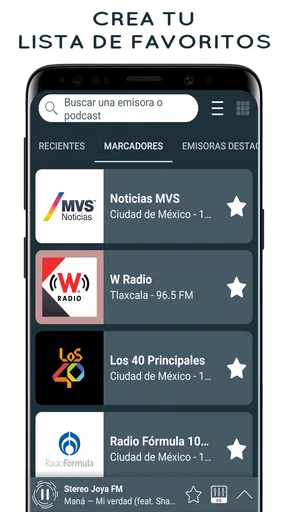
Once I find a station I genuinely enjoy, saving it is more practical than relying on memory. Favorites can turn a broad catalogue into a small personal shortlist: one station for lively background music, another for a different regional sound, and perhaps a talk option. This is especially helpful if I only have a few minutes to choose something before driving or starting a task. The collection is the discovery tool; the saved stations are the everyday shortcut.
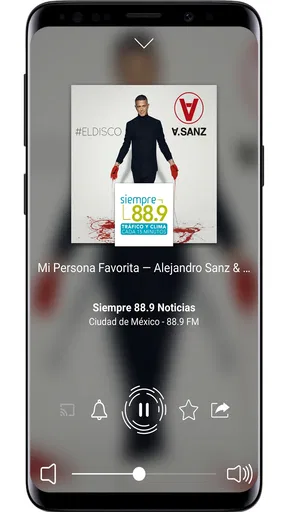
Sharing a station also works best when I send it with a reason. Rather than forwarding a stream at random, I might share one because it has a style a friend likes or because its local character is interesting. That makes the social feature feel connected to what radio does well: passing along a broadcast, not just a track. It is a small detail, but it gives station discovery a natural way to continue outside my own listening.
Sound Quality and Streaming
Now, you might be wondering about the streaming quality. Well, fear not! The sound is crisp and clear, which is just what you need when you’re jamming out to your favorite tunes. I’ve tested it on both Wi-Fi and mobile data—no hiccups or annoying buffering to report. It's smooth sailing all the way.
What to consider before listening on the go
Because this is live radio over the internet, I would treat a reliable connection as part of the experience, particularly when listening away from home. Mobile data can be convenient, but a long listening session may use data, so anyone with a tight allowance should keep that in mind and prefer Wi-Fi when it is available. This is a practical consideration for any streaming radio app, not a reason to rule this one out.
I would also choose a station before setting off rather than browse while driving or doing anything that needs attention. A saved favorite is useful here: it reduces fiddling and gets the stream going with fewer steps. For a quiet room or casual background listening, radio is straightforward; for travel through areas with an unreliable connection, downloaded music is the safer choice because a live stream depends on access to the internet.
Features That Stand Out
One of the cool features of the app is the ability to save your favorite stations. If you find yourself coming back to that one station with the perfect mix, you can bookmark it for easy access later. Plus, the app has a sleep timer feature. So if you’re like me and love falling asleep to the sounds of soothing music, you can set it to turn off automatically.
For bedtime, I would use the timer as a simple boundary: choose a station, set the stream to stop, and avoid leaving audio playing through the night. It is a small convenience, but it changes the app from something I only use when actively browsing into something that can fit into a wind-down routine. I would still pick a calmer station first, since a live broadcast can shift in tone or volume as its programming changes.
Another handy feature is the ability to share what you’re listening to with friends. Found a killer station that your buddy would love? Send it over with a quick tap. It’s a great way to spread the love for Mexican music.
Who will get the most from it
I would recommend this to listeners who enjoy Mexican music and want more than a fixed set of familiar hits, as well as people with ties to Mexico who like having broadcasts from home within easy reach. It can also suit curious listeners who want to explore regional sounds or hear Spanish-language talk in a casual setting. The app is free to download, and its presence on both major mobile platforms makes it approachable for someone who simply wants to try live radio without committing to a paid subscription first.
It is less suited to anyone who expects a fully personalized listening service. There is no reason to choose a station-based app when your main goal is to build a track-by-track queue, replay one song on demand, or keep listening without a connection. Likewise, someone who wants radio from many countries equally may prefer a broader international directory. The focused Mexican selection is an advantage for the right listener, but not a universal substitute for every kind of audio app.
Room for Improvement?
Of course, no app is perfect. While Radio Mexico - online radio does an excellent job, there are a couple of areas where it could improve. For instance, the app could benefit from a more personalized station recommendation system based on your listening habits. That said, the variety is so broad that you'll likely find something you love without too much trouble.
That limitation makes the first few sessions more hands-on than they might be in a service that learns from listening history. I would not expect the app to know my taste automatically; instead, I need to use the available browsing choices, sample stations, and save the ones that suit me. If I want an algorithm to assemble a personalized stream with minimal effort, a recommendation-led music service would be a better match.
There is another small but important distinction between station variety and guaranteed variety in every moment. A large directory gives me many possible starting points, but each individual broadcast still follows its own programming. If I switch stations looking for one particular style, I may need to sample a few before finding the right fit. That is normal for live radio, but listeners who dislike trial and error should set expectations accordingly.
What the app’s scale and cost mean
The app comes from Radio FM Online Free and is listed in the music and audio category. Its 4.8 average from around 135,000 ratings, alongside more than 5 million installs, suggests that it has reached a substantial audience, though popularity alone cannot tell me whether its station mix fits an individual listener. I would use those figures as reassurance that it is an established option, not as a promise that every broadcast will be a personal favorite.
It is free to use as a download, with optional in-app purchases priced from $0.99 to $11.99 per item. That makes it reasonable to try before deciding whether any paid extras matter to you. The app is rated Teen, so families should check that rating against their own preferences, particularly if younger listeners will use it independently. Its current version is 4.1.21, and it requires Android 8.0 or later on Android devices.
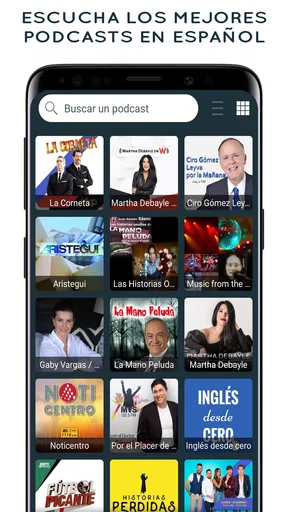
For someone comparing it with a conventional music streaming service, the key question is not which one has more songs; it is whether you want a station or a personal queue. For comparing it with a general radio directory, the question is whether Mexican broadcasts are the main attraction. If they are, this focused catalogue can save time. If you want podcasts, playlists, and stations from many regions all in one listening hub, a broader audio app may be more convenient.
Final Thoughts
All in all, if you’re a fan of Mexican music or just curious about the rich sonic landscape of Mexico, Radio Mexico - online radio is a fantastic app to explore. It’s user-friendly, packed with a diverse range of stations, and offers excellent sound quality. Whether you’re a die-hard fan or a casual listener, this app will have you dancing, singing, and maybe even discovering a new favorite genre.
So go ahead, give it a try. You might just find yourself transported to the vibrant streets of Mexico, if only in spirit. And hey, who doesn’t want a little more fiesta in their life?
Pros
- Wide variety of Mexican stations.
- User-friendly interface.
- High-quality audio streaming.
- Minimal buffering interruptions.
- Customizable station favorites.
Cons
- Contains ads in free version.
- Requires stable internet connection.
- Limited offline features.
- No sleep timer function.
- Occasional station dropout.
FAQs for Radio Mexico - online radio
What is Radio Mexico - online radio?
Radio Mexico - online radio is an app that allows users to stream a wide variety of Mexican radio stations directly on their Android or iOS devices. It includes stations from various genres, such as pop, rock, news, and regional music. The app is designed for easy navigation and provides high-quality audio streaming.
Does Radio Mexico require an internet connection to function?
Yes, Radio Mexico - online radio requires a stable internet connection to stream radio stations. Users can connect via Wi-Fi or mobile data. For uninterrupted listening, a strong and stable connection is recommended, especially for high-quality audio streams. Offline playback is not available, as the app is designed for live streaming.
Is Radio Mexico - online radio free to use?
The app is free to download and use, providing access to a wide range of radio stations without any subscription fees. However, it may include ads to support the free version. Some features might be available through in-app purchases, which can enhance the user experience by removing ads or adding premium content.
Can I listen to Radio Mexico while using other apps?
Yes, Radio Mexico - online radio supports background play. This means you can listen to your favorite stations while using other apps or when your device screen is off. This feature makes it convenient for multitasking, allowing users to enjoy music or news while performing other activities on their devices.
How can I find my favorite radio stations in the app?
Radio Mexico - online radio offers a user-friendly interface with a search feature that allows users to quickly find their favorite stations. You can browse by genre, location, or station name. Additionally, the app may allow you to save your favorite stations for easy access in the future, personalizing your listening experience.


